
Why didn't a greeting send?
Start by finding the greeting:
- Open Schedule in the left menu and go to the person’s celebration day, or open the person’s page.
- Look at the status on each greeting.
- Check the things need your attention card on the dashboard. It often tells you exactly what to fix.
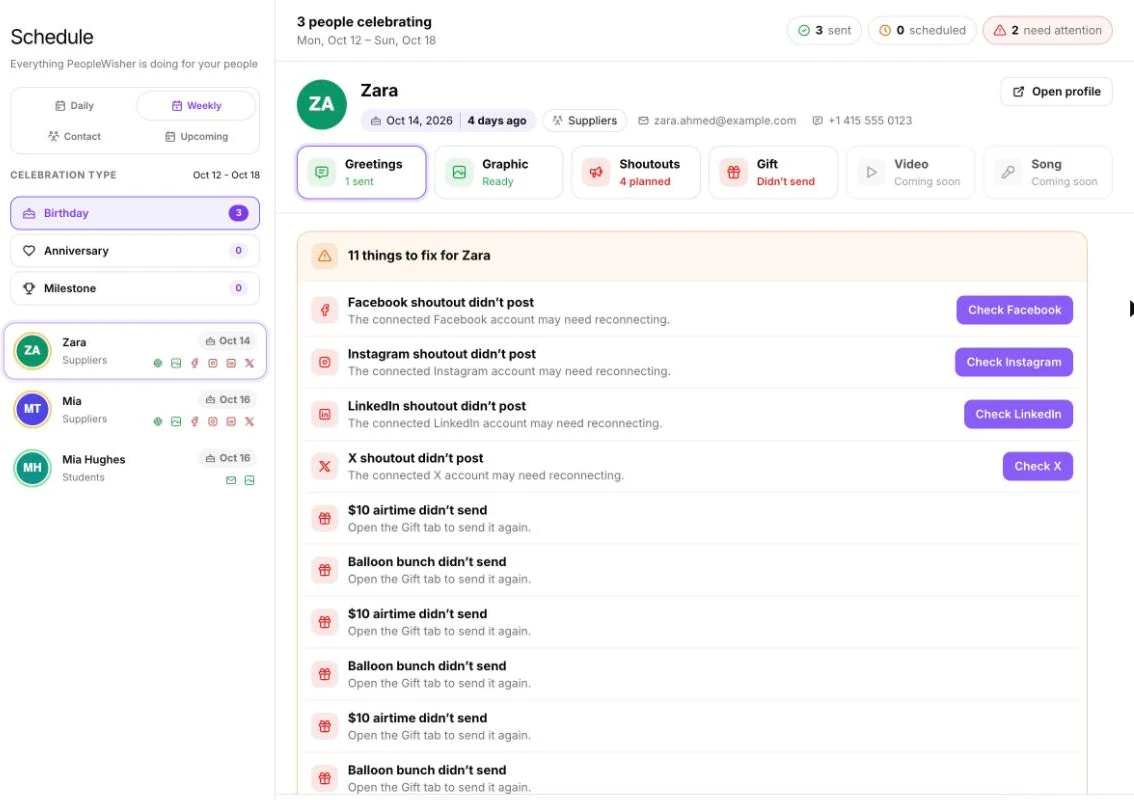
What the status means
Section titled “What the status means”| Status | Meaning |
|---|---|
| Scheduled / Queued | Waiting for its send time. |
| Sending / Retrying | On its way, or being tried again automatically. |
| Sent / Delivered / Posted | It went out. |
| Failed | It was sent but didn’t arrive. The card explains why. |
| Missed | It wasn’t sent on the day. See the checklist below. |
| Can’t send | Something needs fixing first, such as missing contact details. |
| Off | That channel isn’t turned on for the group. |
You can resend failed or missed greetings with Try again or Send now, or reach the person another way with Send by SMS or Send by email.
Checklist: the usual reasons
Section titled “Checklist: the usual reasons”Celebrations are paused or not set up
Section titled “Celebrations are paused or not set up”- Celebrations are paused for {group}: open the group’s Group Schedule and click Turn on.
- No greeting channel is on for {group}: switch on at least one channel and click Save settings.
- {group}’s channels aren’t ready: every channel that’s on needs a template and a send time.
The person is missing details or is paused
Section titled “The person is missing details or is paused”- No email address for email, or no phone number for SMS and WhatsApp. Use Add details or Fix their details.
- Phone numbers should start with the country code, for example +1 (US and Canada), +44 (UK) or +234 (Nigeria).
- The person’s Status is Inactive. Set it to Active.
- Their birthday month or day is wrong. Open their page to check.
Your wallet ran out
Section titled “Your wallet ran out”SMS and X posts need wallet credit. If your balance was too low, they were skipped and we emailed you. Top up, then click Try again.
A channel connection has expired
Section titled “A channel connection has expired”- Email: “Selected Gmail account is no longer connected”. Reconnect your account. See Connect email.
- WhatsApp: the number was disconnected, or the template isn’t approved. See Connect WhatsApp.
- Social: “The post didn’t go out — The connected X account may need reconnecting.” Reconnect under Settings → Social Accounts.
The send time hasn’t come yet
Section titled “The send time hasn’t come yet”Greetings go out at the Send Message at time in your account’s time zone, not the person’s. Check the time zone in Settings → Account info.
The greeting was already sent today
Section titled “The greeting was already sent today”PeopleWisher sends each person one celebration per channel per day, so people never get duplicates.
Your plan limit was reached
Section titled “Your plan limit was reached”If you see Contact limit reached, people added above your plan’s limit won’t receive greetings until you upgrade.
Channel-specific reasons
Section titled “Channel-specific reasons”| You see | What to do |
|---|---|
| Email bounced | The address doesn’t exist. Check for typos. |
| Address is blocked | The person unsubscribed, or their address bounced before. Contact them another way. |
| Email arrived in spam | Send from your own connected email. See Connect email. |
| You see | What to do |
|---|---|
| Number not reachable | Check the number and country code. |
| Blocked by DND | The person has Do Not Disturb turned on with their mobile network (common in some countries, such as Nigeria and India). Consider the SMS Gateway fallback. See SMS and sender IDs. |
| Blocked by the network | Your sender ID may not be approved yet for that network. |
| You see | What to do |
|---|---|
| Not reachable on WhatsApp | The number isn’t on WhatsApp, or the country code is missing. |
| They stopped marketing messages | The person opted out of business messages. Use email or SMS. |
| Template problem / Template paused / Template disabled | Create a new template and wait for approval. See WhatsApp template pending. |
| Spam limit reached / Held back by Meta | Meta is limiting your number. Send fewer messages for a while and make templates more personal. |
Instagram needs an image: turn on graphics for the group. See Social shoutouts.
Still not sure?
Section titled “Still not sure?”Open History in the left menu, find the message and open it to see Delivery details. If you still can’t work it out, contact support with the person’s name, the date and the channel.