
Plans, billing and invoices
PeopleWisher has two separate things you pay for:
- Your plan: a monthly or yearly subscription. It sets how many contacts and groups you can have and unlocks features such as SMS, WhatsApp, graphics and social shoutouts.
- Your wallet: prepaid credit for messages that cost money to send, such as SMS. See Wallet, top-ups and message costs.
See your plan
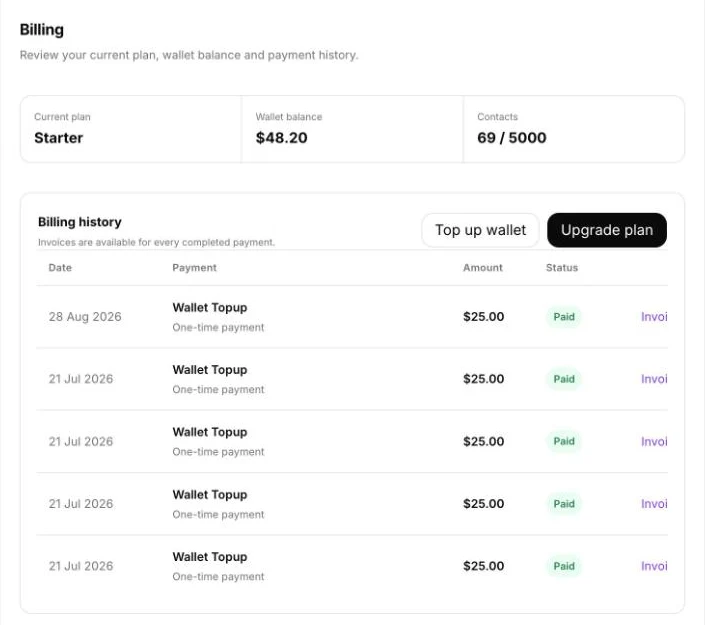
Section titled “See your plan”Go to Settings → Billing. At the top you’ll see:
- Current plan
- Wallet balance
- Contacts: how many you have and your plan’s limit
Upgrade your plan
Section titled “Upgrade your plan”- Click Upgrade plan in Settings → Billing, or click your name and choose Upgrade plan.
- Compare the plans and choose monthly or yearly billing. Yearly billing is cheaper.
- Click the plan you want and complete the payment.
Your new features and limits are available as soon as the payment is confirmed.
Not sure which plan fits? In the upgrade window, click Book a demo and we’ll help you choose.
Download invoices
Section titled “Download invoices”In Settings → Billing, scroll to Billing history. Every completed payment is listed with its date, amount and status. Click Invoice on a row to download it.
When you reach a limit
Section titled “When you reach a limit”- Contact limit reached: people added above your plan’s limit won’t receive greetings until you upgrade.
- Group limit reached: you can’t create more groups until you upgrade.
Click Upgrade Plan on the message, or delete people and groups you no longer need. See Delete contacts and groups.
Change or cancel your plan
Section titled “Change or cancel your plan”To move to a smaller plan or cancel, email hello@peoplewisher.com from your account’s email address. Tell us which plan you’d like and when the change should start.
Want to stop greetings without cancelling? See Pause celebrations.
Payment problems
Section titled “Payment problems”- Payment taken but plan not updated: wait a few minutes and refresh the page. If it still hasn’t changed, contact support with the date and amount of the payment.
- Card declined: check with your bank that international online payments are allowed, then try again.