
Social shoutouts
A social shoutout is a public post celebrating someone on their special day, such as “Happy birthday to our amazing customer Ada!”. PeopleWisher posts it for you automatically.
Social shoutouts are available on paid plans.
Supported networks
Section titled “Supported networks”| Network | Account type | Notes |
|---|---|---|
| A Facebook Page | ||
| An Instagram Business or Creator account | Always needs an image (see below) | |
| Your personal LinkedIn profile | Company pages aren’t supported yet | |
| X | Any X account | Each post is paid from your wallet (see below) |
Step 1: Connect your accounts
Section titled “Step 1: Connect your accounts”- Go to Settings → Social Accounts (or click Connect next to Connect social accounts on the dashboard checklist).
- Click Connect next to a network and sign in in the window that opens.
Using a personal Instagram account? You can switch to a Business or Creator account for free in the Instagram app under Settings → Account type.
Step 2: Turn on shoutouts for a group
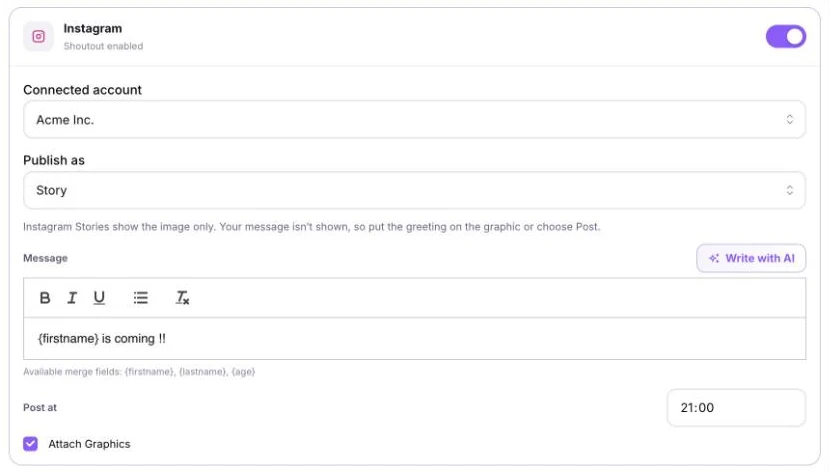
Section titled “Step 2: Turn on shoutouts for a group”- Open the group’s Group Schedule → Default Scheduler → Social Shoutouts tab.
- Switch on the network you want. It changes to Shoutout enabled.
- Choose the Connected account.
- Write the Message. You can use
{firstname},{lastname}and{age}. - Set Post at.
- Tick Attach Graphics to include the person’s celebration graphic.
- Click Save settings.
Instagram: Post or Story
Section titled “Instagram: Post or Story”Instagram always needs an image, so turn on graphics for the group first. If a person has no graphic yet, the shoutout isn’t posted.
Under Publish as, choose:
- Post: the graphic appears in your feed with your message as the caption.
- Story: the image only. Instagram Stories don’t show your message, so put the greeting on the graphic itself, or choose Post.
X: cost per post
Section titled “X: cost per post”Each post on X is paid from your wallet, because X charges for posting. The exact price is shown in the X shoutout settings. At the time of writing:
| Wallet currency | Per post | Per post with a link |
|---|---|---|
| US dollars | $0.02 | $0.205 |
| Indian rupees | ₹1.60 | ₹16.40 |
| Nigerian naira | ₦30 | ₦307.50 |
Posts that don’t go out aren’t charged. If your wallet is too low, the post is skipped with Not posted: … Top up your wallet to post on X.
Posts on X are limited to 280 characters. Longer messages are shortened with “…”. Avoid links in X shoutouts to keep the cost low.
Facebook, Instagram and LinkedIn shoutouts have no extra cost.
Troubleshooting
Section titled “Troubleshooting”- The post didn’t go out: the connected account may need reconnecting. Go to Settings → Social Accounts, disconnect it and connect it again.
- Instagram needs an image: switch on Create Graphics Automatically for the group and make sure the person has a photo.