
Pause celebrations
You can pause greetings at three levels. Your messages, templates and send times are kept, so turning them back on takes one click.
| You want to stop… | Do this |
|---|---|
| Everything for a group | Pause the group |
| One channel for a group (for example SMS only) | Turn off that channel |
| Greetings for one person | Set the person to Inactive |
Pause a whole group
Section titled “Pause a whole group”With the AI Assisted Schedule:
- Open the group and click the Group Schedule tab, then AI Assisted Schedule.
- Ask the assistant “Pause celebrations for {group}”. It’s one of the suggested prompts.
- Check the proposal (“Pause: turn every greeting off (messages and times are kept)”) and click Apply.
The status at the top changes to Paused.
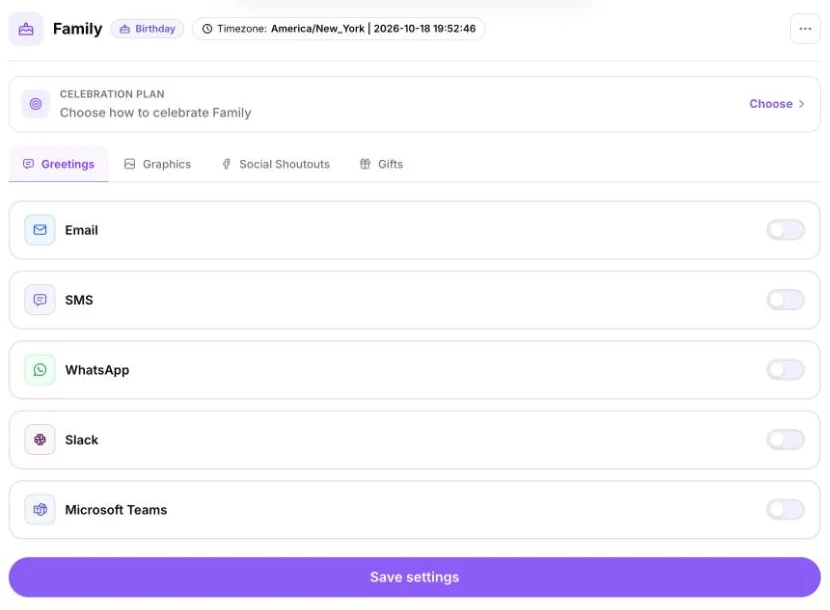
With the Default Scheduler: switch off each channel card (Email, SMS, WhatsApp, Slack and Teams) and click Save settings. The group then shows No greetings on. To restart, switch the channels back on and save. Your templates and times are still selected.
Turn celebrations back on
Section titled “Turn celebrations back on”Open the group’s Group Schedule. You’ll see Greetings are set up but paused, so nothing will be sent. Click Turn on celebrations (or Turn on in the Default Scheduler).
Pause one channel
Section titled “Pause one channel”- Open the group’s Group Schedule → Default Scheduler.
- Switch off the channel card you want to stop, for example SMS.
- Click Save settings.
On the Schedule page, that channel now shows Off for people in the group.
Pause one person
Section titled “Pause one person”Use this for someone who has left, asked not to be contacted, or shouldn’t get a greeting this year.
- Open the person’s page from the People column.
- Edit their details and set Status to Inactive. This means “Paused — no celebrations are sent”.
- Save.
Their page shows Inactive, and a pause badge appears next to their name in the People list. Set them back to Active to include them again.
Pause other things
Section titled “Pause other things”- Gifts: in Gift Center, switch off the group’s gift automation. It shows Paused.
- Campaigns: open the campaign and click Pause. Nobody new is enrolled and nobody moves forward until you click Resume.
- Social shoutouts: switch off the network in the group’s Social Shoutouts tab and click Save settings.
Pausing your whole account
Section titled “Pausing your whole account”There’s no single switch for the whole account. Pause each group instead. Your groups and settings stay as they are, and your plan continues as normal. To cancel your plan, see Plans, billing and invoices.
Pause or delete?
Section titled “Pause or delete?”Pausing keeps everything so you can switch back on later. Deleting is permanent. See Delete contacts and groups.