
Message personalisation
Placeholders are short codes in curly brackets, such as {firstname}. When a greeting is sent, PeopleWisher replaces each one with that person’s details.
You write: Happy birthday, {firstname}! 🎉 Everyone at Acme hopes your {age_ordinal} birthday is the best yet.
Ada receives: Happy birthday, Ada! 🎉 Everyone at Acme hopes your 31st birthday is the best yet.
Placeholders work in email (subject and body), SMS, WhatsApp, Slack, Microsoft Teams and social shoutouts.
Placeholders you can use
Section titled “Placeholders you can use”| Placeholder | Becomes |
|---|---|
{firstname} |
First name, e.g. Ada |
{lastname} |
Last name |
{fullname} |
First and last name |
{age} |
Age, e.g. 31 (needs a birth year) |
{age_ordinal} |
Age as 31st (needs a birth year) |
{job_title} |
Job title |
{company} |
Company |
{email} |
Email address |
{phone} |
Phone number |
{location} |
Location |
{business_name} |
Your business name |
Email only:
| Placeholder | Becomes |
|---|---|
{unsubscribe_url} |
A link people can use to stop receiving your greetings |
{mailing_address} |
Your business address, from your email settings |
You’ll find the full list, including your own custom fields, in Settings → Personalization. Click any placeholder to copy it.
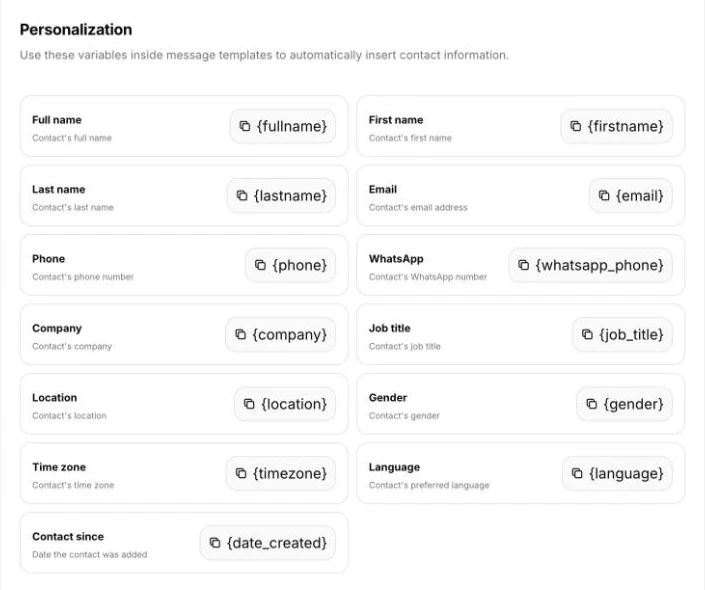
Adding placeholders
Section titled “Adding placeholders”- Email Designer: click a Text block, then use Insert Placeholder. The Contact Photo block adds the person’s own photo.
- SMS, WhatsApp, Slack and Teams: type the placeholder into the message, or paste it from Settings → Personalization.
Capital letters don’t matter: {FirstName} and {firstname} both work.
Add your own details with custom fields
Section titled “Add your own details with custom fields”Want to mention something PeopleWisher doesn’t store by default, such as a member number or favourite team?
- Go to Settings → Contact / Custom Fields.
- Click Add field, give it a name and choose a type (for example Text or Date).
- Click Save custom fields.
- Fill in the field for your people. You can also include it as a column when you import contacts.
- Copy its placeholder from Settings → Personalization. It looks like
{custom:12}.
Tips for natural-sounding messages
Section titled “Tips for natural-sounding messages”- Missing details show as blank. If someone has no first name saved, “Dear {firstname},” becomes “Dear ,”. Use the People filters to fill gaps, or write messages that still read well without the detail.
- Age needs a birth year.
{age}and{age_ordinal}are blank for people without a birth year. Only use them in groups where you know everyone’s year. - Check your spelling. A misspelt placeholder, such as
{frstname}, is sent exactly as typed. - Previews show the codes. Template previews show
{firstname}rather than a real name. To see a real example, use Preview on a row in the group’s Your celebration plan, or open the person on the Schedule page.
WhatsApp templates are approved by Meta with their placeholders included, and each person’s details are filled in when they’re sent. Don’t start or end a WhatsApp message with a placeholder, as Meta often rejects these.
Want a completely different message for each person?
Section titled “Want a completely different message for each person?”Placeholders change the details, but everyone gets the same wording. For a unique greeting for every person, see Special personal messages.