
SMS and sender IDs
A sender ID is the name or number people see when your text arrives, for example ACMESTORE instead of an unknown number. Mobile networks require sender names to be registered and approved before use.
SMS is available on paid plans.
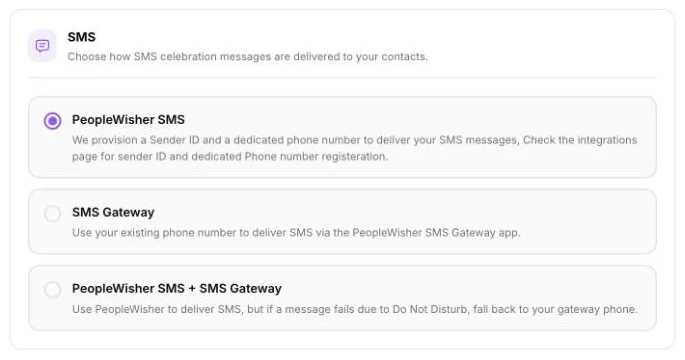
Step 1: Choose how SMS is sent
Section titled “Step 1: Choose how SMS is sent”Go to Settings → Deliverability → SMS and pick one option:
- PeopleWisher SMS: we send your texts using a registered sender ID or a dedicated phone number. Charged from your wallet.
- SMS Gateway: texts are sent from your own Android phone using the PeopleWisher SMS Gateway app. This uses your phone’s own SMS plan and isn’t charged from your wallet.
- PeopleWisher SMS + SMS Gateway: uses PeopleWisher SMS, and if a message is blocked by Do Not Disturb, tries again from your gateway phone.
Step 2: Register a sender ID
Section titled “Step 2: Register a sender ID”- On the dashboard checklist, click Set up next to Set up SMS, or open a group’s Group Schedule → Default Scheduler → SMS card.
- Click Add New Sender or Use Existing Number.
- Under Register Sender ID, follow the steps for your country (see below).
United States, Canada and Latin America
Section titled “United States, Canada and Latin America”In the US and Canada, texts come from a phone number rather than a sender name. Under Choose a dedicated phone number, search for a number and pick one. Some numbers work instantly (Instant); others take 1–3 business days to activate. US numbers may also need a one-time carrier registration, shown as 10DLC campaign needed.
This option appears when your account’s time zone (in Settings → Account info) is in the Americas.
SMS in India needs DLT registration. Connect your own SMS provider (such as MSG91, Fast2SMS, Kaleyra, TextLocal or Exotel) under Connect Another Provider. You can also celebrate with WhatsApp and email.
Nigeria
Section titled “Nigeria”- Fill in Sender name (11 chars max), Full company name and Description of business.
- Click Save sender name. You’ll see Sender name submitted for approval.
- The status in the table changes from Pending to Approved or Rejected. We email you when it’s approved.
Sender name rules:
- 3 to 11 characters.
- Use your business or brand name so networks recognise it.
- Each name can only be registered once.
Until your sender ID is approved, birthday texts in Nigeria are sent with the sender name Happy Bday.
UK, Europe and other countries
Section titled “UK, Europe and other countries”Email hello@peoplewisher.com and our team will register a sender ID for you.
Prefer to use your own number?
Section titled “Prefer to use your own number?”Choose Use My Phone Number to send from a number you already have.
Step 3: Use the sender ID in your schedule
Section titled “Step 3: Use the sender ID in your schedule”In the group’s SMS card, choose your sender under SMS Sender ID, pick a template and a send time, then click Save settings.
Message length and cost
Section titled “Message length and cost”- One SMS holds up to 160 characters. Longer messages are sent as several parts, and each part is charged.
- Emojis and some special characters reduce the limit to 70 characters per part.
- See Wallet and costs for prices.
Troubleshooting
Section titled “Troubleshooting”- “Please select SMS Sender ID”: choose a sender in the SMS card before saving.
- Texts not sent and wallet low: scheduled texts are skipped when your wallet can’t cover them, and we email you. Top up and use Try again on the Schedule page.
- Number not reachable or Blocked by the network: check the person’s phone number includes the right country code.