
Groups explained
A group is a set of people who are celebrated the same way. Everyone in a group shares one celebration schedule: the same messages, channels and send times.
Typical groups are Staff, Clients, Members and Family.
Why groups matter
Section titled “Why groups matter”- Different audiences, different messages. Put customers and staff in separate groups so customers get a friendly offer and staff get a team shout-out.
- One occasion per group. Each group celebrates one kind of occasion: birthday, work anniversary, wedding anniversary or anniversary. To celebrate both birthdays and work anniversaries for your staff, create a group for each.
- Switch things on and off together. Pausing a group pauses greetings for everyone in it.
Create a group
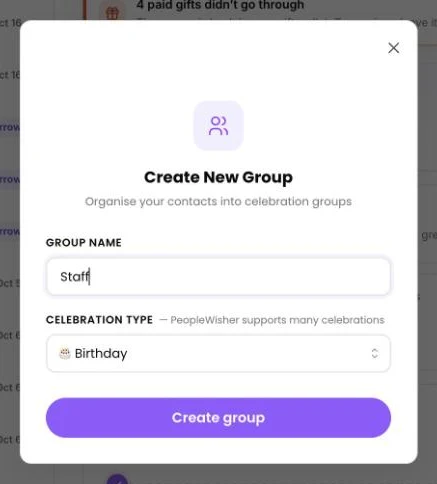
Section titled “Create a group”- In the People column, click + and choose New Group.
- Enter a Group name, for example Staff. Use letters, numbers, spaces and
_ ( ) -only. - Choose the Celebration type: 🎂 Birthday, 💼 Work Anniversary, 💍 Wedding Anniversary or 🎉 Anniversary.
- Click Create group.
Add people to a group
Section titled “Add people to a group”- Choose the group when you add a person by hand.
- Choose it under Add them to when you import a list.
- Share a form link from the group page (Add Contact(s) → Create Form Link).
- Keep the group filled automatically from another app (Sync via API or webhook, on paid plans).
The group page
Section titled “The group page”Open a group from the People column (switch to Groups at the top). It has two tabs:
- Celebration Summary: upcoming dates, how many people can be reached, and missing details.
- Group Schedule: the messages, channels, send times, graphics, shoutouts and gifts for the group. See Set up a group schedule.
If nothing is set up to send yet, the Group Schedule tab shows a dot marked Not set up yet.
Pause one person
Section titled “Pause one person”To stop greetings for a single person without removing them, open their page and set their Status to Inactive. This means “Paused — no celebrations are sent”.
Pause or delete a group
Section titled “Pause or delete a group”- To stop greetings but keep everything, see Pause celebrations.
- To remove the group and everyone in it for good, see Delete contacts and groups.
Limits
Section titled “Limits”Each plan includes a set number of groups. If you reach it, you’ll see Group limit reached. Upgrade your plan to create more groups.