
Special personal messages
By default, everyone in a group gets the same template, with their name filled in. With special personal messages, each person gets a greeting written just for them.
Turn on special messages for a channel
Section titled “Turn on special messages for a channel”- Open the group’s Group Schedule tab and switch to Default Scheduler.
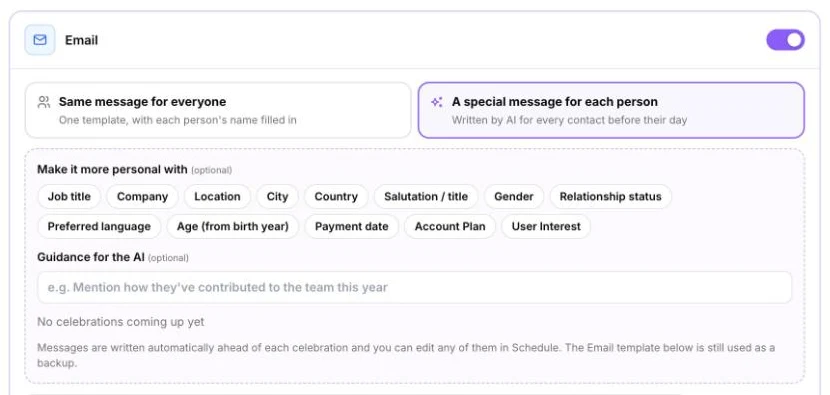
- In a channel card (for example Email), choose A special message for each person. This means “Written by AI for every contact before their day”.
- Optional: under Make it more personal with, pick details to use, such as job title.
- Optional: add Guidance for the AI, for example “Mention how they’ve contributed to the team this year”.
- Click Save settings.
You can also ask the AI Assisted Schedule assistant: “Write a special message for each person.”
PeopleWisher writes messages ahead of each celebration. You’ll see a status such as 8 of 10 ready · next 14 days. To write them straight away, click Write them now.
Review and edit a message
Section titled “Review and edit a message”- Click Review in Schedule, or open Schedule from the left menu.
- Find the person and click the pencil (Edit message) on their greeting.
- Change the text (and the subject, for email), then click Save.
Your edit only changes that person’s message. The group template stays the same. Edited greetings show a Personalized tag.
You can edit a single person’s message this way even when the group uses the same message for everyone.
Your template is the backup
Section titled “Your template is the backup”The channel’s template is still used if a special message can’t be written in time. If some couldn’t be written, you’ll see N couldn’t be written (template will be used).
Switch back to one message for everyone
Section titled “Switch back to one message for everyone”Choose Same message for everyone and save. PeopleWisher removes the AI messages you haven’t edited. Messages you edited by hand are kept.
Messages sent through the official WhatsApp connection must use a template that Meta has approved, word for word. That’s why special messages can’t be used for approved WhatsApp templates. Each person’s name and details are still filled in.
Why can’t I turn it on?
Section titled “Why can’t I turn it on?”| Message | What it means |
|---|---|
| Celebrations are paused for this group. | Turn celebrations on for the group first. |
| Turn this channel on and save first. | Switch the channel on in the schedule and click Save settings. |
| Approved WhatsApp templates must be sent exactly as approved… | See the WhatsApp section above. |