
Account and sign-in help
Can’t sign in
Section titled “Can’t sign in”- Check you’re using the email address you signed up with.
- Click Forgot password? on the sign-in page.
- Enter your email address and click Send reset link.
- Open the email from PeopleWisher and click the link.
- Choose a new password, type it again under Confirm new password, and save.
Don’t see the email? Check your spam or junk folder, and wait a few minutes before trying again.
“Link invalid or expired”: reset links only work for a limited time and only once. Request a new one.
Change your password
Section titled “Change your password”Use the same steps as above: sign out, click Forgot password? and choose a new password.
Change your email address
Section titled “Change your email address”Your sign-in email is shown in Settings → Account info, but it can’t be changed there. Email hello@peoplewisher.com from your current address and tell us the new one.
Turn on two-factor authentication
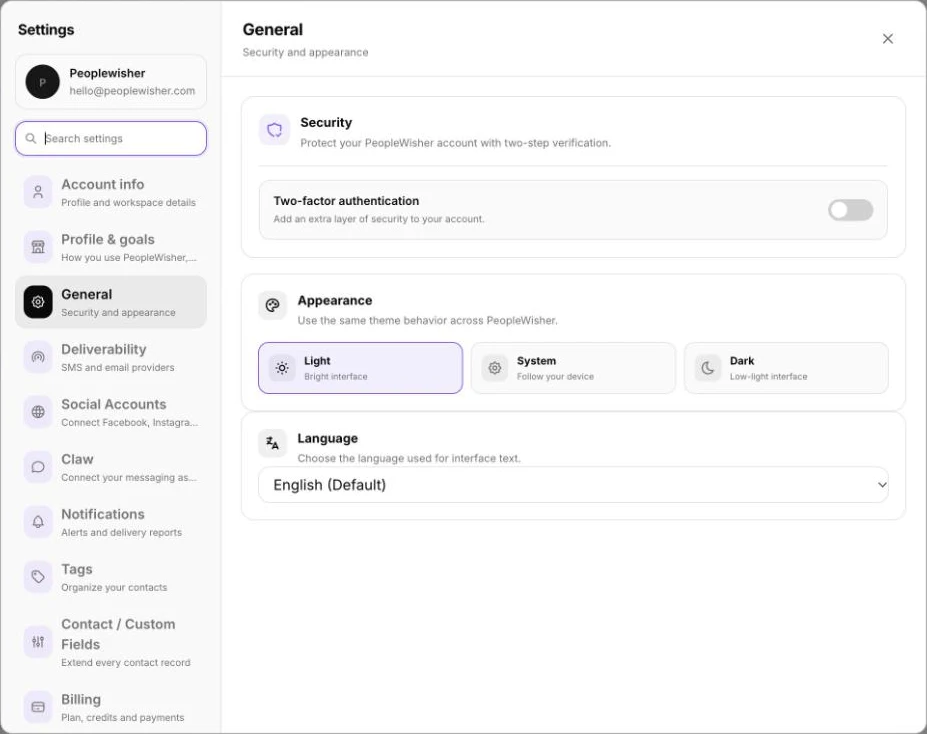
Section titled “Turn on two-factor authentication”Two-factor authentication (2FA) asks for a code from your phone when you sign in, which keeps your account safe even if someone learns your password.
- Go to Settings → General.
- Under Security, switch on Two-factor authentication.
- Scan the QR code with an authenticator app, such as Google Authenticator or Microsoft Authenticator.
- Enter the 6-digit code from the app to confirm.
From now on, enter the code from your app each time you sign in.
Change your time zone
Section titled “Change your time zone”Greetings are sent at your chosen times in your account’s time zone.
- Go to Settings → Account info.
- Choose your Timezone.
- Click Save changes.
Change the app’s appearance or language
Section titled “Change the app’s appearance or language”Go to Settings → General:
- Appearance: Light, Dark or System.
- Language: English, French or Spanish.
Choose which notifications you get
Section titled “Choose which notifications you get”Go to Settings → Notifications to choose:
- Celebration Reminders: a monthly, weekly or daily email listing upcoming celebrations.
- Who else should get copies of these emails (CC recipients).
- Push notifications in your browser, for example for Greetings that didn’t go out or Needs attention. You can also set Quiet hours.
Update your business details
Section titled “Update your business details”Go to Settings → Profile & goals to update your business name, what you do, who you celebrate and your tone of voice. PeopleWisher AI uses these when it writes messages for you.
Delete your account
Section titled “Delete your account”Email hello@peoplewisher.com from your account’s email address and ask us to delete your account. This removes your people, groups, templates and history, and can’t be undone.